Quick update and a request today.
First off, thanks everyone for your feedback. I've got a couple of things in the works that should help the target selection screen some.
Much of the development has turned to the theoretical on how best to make a few things work in the full version. Expect things to slow down some, though not stop completely. I have a surprise that would be great if I can make it happen. As long as I can navigate the twisty maze that is apple's SDK while avoiding the issues with geocaching.com's terms of use. Once I find a clear path I'll announce it. In the meantime, keep going with the suggestions. Feel free to repeat yourself if you feel strongly about it. =)
I'll probably post a screenshot or two here later in the week.
As for the request.
I don't feel like many of the reviews are totally accurate on the itunes store. I'd like your help with that. The top reviews that show up in iTunes really don't represent Geopher very well at this point. If you guys could go over there and rate some of the reviews as helpful or non-helpful I would be grateful.
That said, and this is important!
I don't want anyone to lie or fanatically promote geopher. If you write a review, be fair but honest. If you say a review was helpful (or not helpful), be honest.
As a reminder, Geopher Lite isn't meant to be a full geocaching supplement. It's for those times that you want to go grab a cache and haven't prepared for it in advance. I understand that many people want it to be more than that. That's what the full version is being developed for. Give it time. =)
Thanks everyone for your help and support in moving this forward.
Monday, August 18, 2008

Thursday, August 14, 2008
It's up!
The new version is up. Go get it!
You know the drill -- post feedback here. I want to hear your comments, both good and bad!
Thanks for using Geopher Lite!
Edit: For those of you curious, check the main iPhone settings for skin selection. If there's demand I can move these into the app itself, but it seemed like a good idea at the time. =) Apologies for the confusion.
You know the drill -- post feedback here. I want to hear your comments, both good and bad!
Thanks for using Geopher Lite!
Edit: For those of you curious, check the main iPhone settings for skin selection. If there's demand I can move these into the app itself, but it seemed like a good idea at the time. =) Apologies for the confusion.
Tuesday, August 12, 2008
While we wait...
... for apple to approve the update, here are a few more screenshots of 1.0.4.
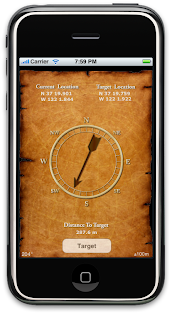
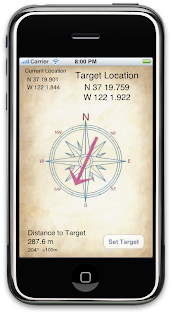
I plan on revisiting the compass in the future to make it less uni-directional (i.e. move the letters around a bit, so that whatever is at the top looks right). That will likely come with the compass rotation. Which I may not get done to my satisfaction until Apple releases their 2.1 firmware that is in beta. We shall see. Wish me luck on that one. =)
I'm planning a smaller release cycle this time around and will focus a bit more on the target setting page. I'd like to revisit the look of the buttons and see if I can squeeze a bit more space out of there. There's not a lot to work with, but I have a couple of ideas, none of which are particularly new to the iPhone. But new to Geopher Lite.
If you could pick one feature that Geopher Lite could have, other than saving multiple targets, what would it be? (Look at the next post down to make sure your request isn't already added -- I had a 2 star review in the app store recently that has 2 of 3 issues they had with Geopher Lite already submitted with 1.0.4)
As always, thanks for the feedback and thanks for stopping by!


I plan on revisiting the compass in the future to make it less uni-directional (i.e. move the letters around a bit, so that whatever is at the top looks right). That will likely come with the compass rotation. Which I may not get done to my satisfaction until Apple releases their 2.1 firmware that is in beta. We shall see. Wish me luck on that one. =)
I'm planning a smaller release cycle this time around and will focus a bit more on the target setting page. I'd like to revisit the look of the buttons and see if I can squeeze a bit more space out of there. There's not a lot to work with, but I have a couple of ideas, none of which are particularly new to the iPhone. But new to Geopher Lite.
If you could pick one feature that Geopher Lite could have, other than saving multiple targets, what would it be? (Look at the next post down to make sure your request isn't already added -- I had a 2 star review in the app store recently that has 2 of 3 issues they had with Geopher Lite already submitted with 1.0.4)
As always, thanks for the feedback and thanks for stopping by!
Saturday, August 9, 2008
1.0.4 official changelog
Here is the official changelog for 1.0.4:
GPS is now turned off when not in target mode to save on battery.
Target Latitude/Longitude text fields are now more helpful when entering coordinates.
The Map button now does a pin drop on the maps application instead of directions.
Fixed a crash bug with entering coordinates and some cosmetic bugs.
Target screen now does not go to sleep.
Changed animation between views.
Added accuracy and bearing to target screen.
Added application preferences including:
Added Different looks to choose from for Geopher Lite's target screen.
Added preference for feet vs. meters.
Added preference for found caches in search.
One thing I did not officially add here is compass roatation. My beta testers have a version with compass rotation working, but I've not heard any details back from any of them about it. I am not personally satisfied with the compass rotation.
However.
in 1.0.4 type "rotate" into the latitude or longitude coordinates and compass rotation will be turned on until you quit the application. I likely won't mention this again, I hate to make the general public unwilling beta testers. I've gotten a lot of requests for this and wanted people to see some progress without me forcing this on everyone. Hope someone appreciates it. =)
As a reminder, the rotation works fine if you're moving around quickly, but walking around in a small area has problems. There are limitations just due to how a gps compass works. Until I get the problems that I can fix worked out it won't be live.
I neglected to mention a thanks to jamie for supplying an additional skin that is a part of this release.
Between victor, jamie and myself we now have 4 different target screens to choose from. There's the one listed in the previous post by victor, an additional skin by victor, my (modified slightly) original, and this look:

Thanks Jamie!
GPS is now turned off when not in target mode to save on battery.
Target Latitude/Longitude text fields are now more helpful when entering coordinates.
The Map button now does a pin drop on the maps application instead of directions.
Fixed a crash bug with entering coordinates and some cosmetic bugs.
Target screen now does not go to sleep.
Changed animation between views.
Added accuracy and bearing to target screen.
Added application preferences including:
Added Different looks to choose from for Geopher Lite's target screen.
Added preference for feet vs. meters.
Added preference for found caches in search.
One thing I did not officially add here is compass roatation. My beta testers have a version with compass rotation working, but I've not heard any details back from any of them about it. I am not personally satisfied with the compass rotation.
However.
in 1.0.4 type "rotate" into the latitude or longitude coordinates and compass rotation will be turned on until you quit the application. I likely won't mention this again, I hate to make the general public unwilling beta testers. I've gotten a lot of requests for this and wanted people to see some progress without me forcing this on everyone. Hope someone appreciates it. =)
As a reminder, the rotation works fine if you're moving around quickly, but walking around in a small area has problems. There are limitations just due to how a gps compass works. Until I get the problems that I can fix worked out it won't be live.
I neglected to mention a thanks to jamie for supplying an additional skin that is a part of this release.
Between victor, jamie and myself we now have 4 different target screens to choose from. There's the one listed in the previous post by victor, an additional skin by victor, my (modified slightly) original, and this look:

Thanks Jamie!
Thursday, August 7, 2008
Sneak Peek
The next update is getting closer.
It's been too long since we've had screenshots on here. We need some more.


Once the compass starts updating then there is also a bearing that shows in the bottom left corner similar to the accuracy.
Special thanks to victor for two excellent new target screen faces that can be used with this upcoming version.
Thanks everyone for your feedback. Keep it coming!
It's been too long since we've had screenshots on here. We need some more.


Once the compass starts updating then there is also a bearing that shows in the bottom left corner similar to the accuracy.
Special thanks to victor for two excellent new target screen faces that can be used with this upcoming version.
Thanks everyone for your feedback. Keep it coming!
Monday, August 4, 2008
Opinions
Okay, I need some opinions from you, my fellow geopher lite users. And because of that I have now turned on comments by anyone, you don't need a blogger account to comment.
I have a rough compass working. It works great if you're travelling in a car. If you are just walking around in a small area it is wildly inaccurate. I'm not giving up and still have some ideas on this. However, until l can get that working in a place where I feel good about it I'm not going to release the compass rotation.
That's where you come in.
I'd like to hear your opinions on if you would like me to make more regular releases to apple and have geopher lite change over time or would you rather have me take a bit more time and just release one or two updates that get it all right? There are pros and cons both ways.
I'm not making this a democracy, but I would like to know a general feel of what you all would prefer. You know, other than have it all done tomorrow and all working. =)
Thanks for your continued support. Additional feedback is always welcome.
I have a rough compass working. It works great if you're travelling in a car. If you are just walking around in a small area it is wildly inaccurate. I'm not giving up and still have some ideas on this. However, until l can get that working in a place where I feel good about it I'm not going to release the compass rotation.
That's where you come in.
I'd like to hear your opinions on if you would like me to make more regular releases to apple and have geopher lite change over time or would you rather have me take a bit more time and just release one or two updates that get it all right? There are pros and cons both ways.
I'm not making this a democracy, but I would like to know a general feel of what you all would prefer. You know, other than have it all done tomorrow and all working. =)
Thanks for your continued support. Additional feedback is always welcome.
Saturday, August 2, 2008
Update in the works
Currently I have a couple of minor fixes working in the next release, including google maps working more as expected and an easier way of entering latitude and longitude coordinates. The new arrow interface is coming along nicely. I want to take the time to get the compass working correctly so it's taking a bit longer than I had expected. Patience will be rewarded. =)
I have also signed on a handful of people as beta testers to help out. Additional beta testers may or may not happen, I am not looking for more right now though.
Per usual, please post your gripes, praise and suggestions.
Thanks everyone for your support.
I have also signed on a handful of people as beta testers to help out. Additional beta testers may or may not happen, I am not looking for more right now though.
Per usual, please post your gripes, praise and suggestions.
Thanks everyone for your support.
Subscribe to:
Posts (Atom)
About Me

- DadGuy
- DadGuy has been working with apple computers since the mac classic. I love games and puzzles and like to solve problems. I'm having a blast developing for the iPhone and iPad.


